
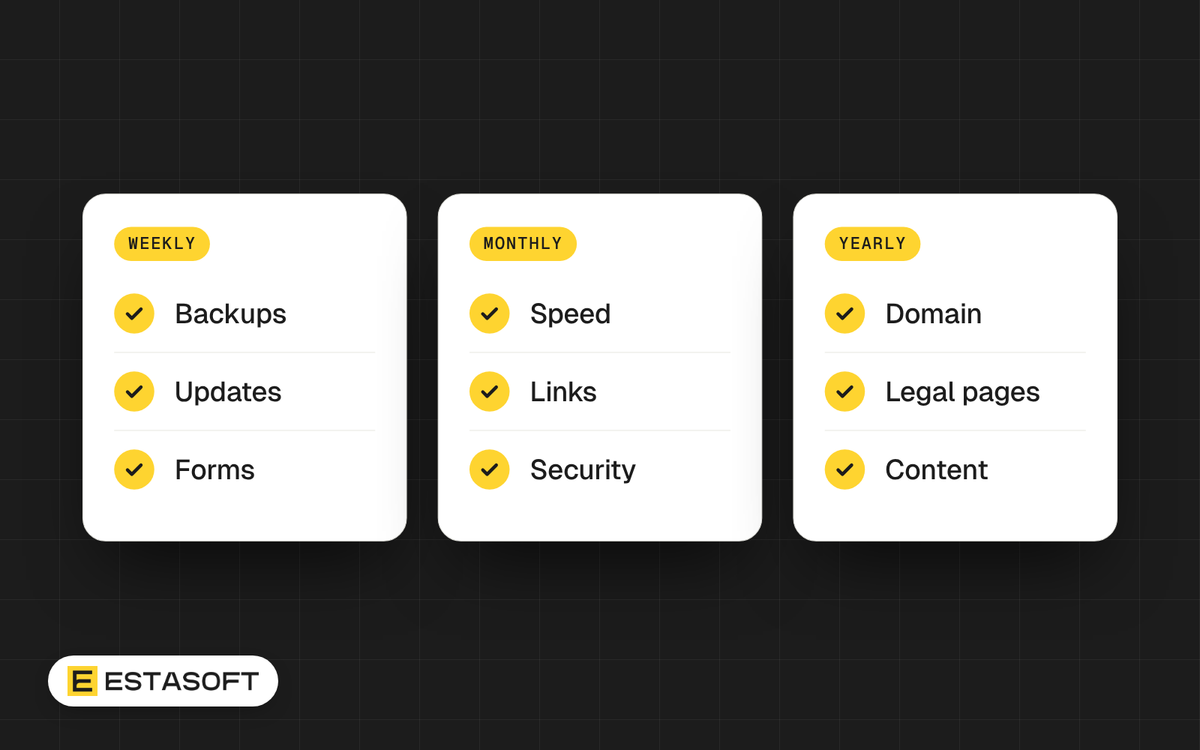
This website maintenance checklist is for owners and managers of a live website or online store. It lists what to check weekly, monthly and yearly, why each task matters, and who usually does it. You can copy the lists into a calendar or hand them to your developer.
We checked the dates and rules below on 30 October 2026. This is general information, not legal, tax or professional security advice. Check with a qualified adviser in your country for legal pages and security duties.
Start with certificate and domain dates
Two expiry dates can take a site offline in a day: the TLS certificate (the padlock) and the domain name. The certificate rules are changing fastest.
At the time of writing (30 October 2026), the CA/Browser Forum TLS Baseline Requirements, version 2.3.1 dated 4 October 2026, set the maximum certificate validity at 200 days from 15 March 2026, 100 days from 15 March 2027 and 47 days from 15 March 2029. For new public certificates, renewing once a year by hand is already over. Let's Encrypt, a certificate authority, announced on 7 October 2026 that its default lifetime moves from 90 days to 64 days on 10 February 2027. Its lifetimes page says it plans 45 days by February 2028.
The practical result: renewal must be automatic, and someone must be alerted when it fails. Ask your host in writing who renews the certificate and how you are told if it does not. On Shopify, TLS certificates are provided for free for domains added to the store, and third-party certificates cannot be used. Your task there is to confirm the domain shows as connected.
The same Baseline Requirements table also shortens how long a certificate authority may reuse proof that you control a domain: 200 days now, 100 days from 15 March 2027 and 10 days from 15 March 2029. Let's Encrypt advises software with a fixed renewal schedule to renew at about two-thirds of the certificate lifetime, and says automation is essential.
Weekly tasks
- Load the key pages on a phone. Check the home page, a product or service page, the contact page and, for a shop, the cart and checkout. You find broken layouts before customers do.
- Send a test through every form. Confirm the message reaches the right inbox and not spam. For a shop, place a test order.
- Check uptime alerts. Use an uptime monitor that tells a named person, and test once that the alert really arrives.
- Look at pending updates. In WordPress, Dashboard > Updates lists pending core, plugin, theme and translation updates and the time until the next automatic update. Minor core updates are on by default. Plugin and theme auto-updates are opt-in, item by item, since WordPress 5.5.
- Confirm the latest backup exists. WordPress.org advises a backup about once a week for a smaller site and daily for a high-activity one, and always before an upgrade. Treat a shop with daily orders as high-activity.
- Check who has admin access. Remove accounts nobody needs. WooCommerce's PCI guidance asks owners to log and review admin activity and restrict access to sensitive areas, and WordPress.org's hardening guide suggests two-step authentication as an extra layer.
Monthly tasks
- Apply updates in a batch, after a backup. The WordPress upgrade guide warns that without a full site and database backup, a successful rollback is near impossible. The UK Cyber Essentials requirements (version 3.3, April 2026) ask for updates that fix critical or high-risk vulnerabilities, or CVSS v3 scores of 7 or above, within 14 days of release. You do not need the certification to use that as your target. The same document requires software to be licensed and supported.
- Restore a backup to a test location. WordPress.org's hardening guide stresses backup integrity and recommends regularly timed snapshots, so you have a version from before any attack. Its backup guide recommends keeping at least three to five recent backups, stored in different locations. A test restore proves that a copy works; that step is our advice, not a rule from those guides. See the 3-2-1 backup rule guide.
- Run a speed check on three pages. Google's good values, measured at the 75th percentile, are LCP of 2.5 seconds or less, INP of 200 milliseconds or less and CLS of 0.1 or less. PageSpeed Insights field data covers the previous 28 days, so a fix shows slowly.
- Open WordPress Site Health. Under Tools, it sorts findings into critical issues, recommended improvements and passed tests. An outdated PHP version is one of its examples of a critical issue.
- Look for broken links. Fix them or redirect them.
Yearly tasks
- Domain. For generic domain endings such as .com, ICANN's expired registration policy requires registrars to send at least two renewal notices, about one month and about one week before expiry. If the registrar deletes the name, there is a 30-day redemption period, and a fee may apply. Registrars must also send an annual reminder to review your contact details. Country domains such as .iq or .ae may follow their own registry rules, so ask your registrar. Keep the registrar login with the company, not with a former developer, and check the payment card. More in the domains and DNS guide.
- PHP and hosting. WordPress.org recommends PHP 8.3 or greater, and WooCommerce's documentation lists the same minimum. WooCommerce calls PHP 7.4 a legacy version past its official end of life. Ask your host which version you run.
- Plugins and apps. Remove what you do not use. Site Health lists inactive plugins and themes as a recommended improvement. On Shopify, app subscriptions bill separately from your plan, so review them too.
- Legal and trust pages. Re-read privacy, cookies, terms, returns, accessibility and contact details against what the business does today.
- People. Remove access for staff and suppliers who have left.
- Calendar. Put certificate, domain, hosting and payment card expiry dates in a shared calendar, with a named person for each date.
Who does what
- Owner: holds the domain, hosting, payment and platform accounts, approves legal text and decides who gets access.
- Host or platform: runs the servers. WordPress.org's hardening guide says to understand where the host's responsibility ends and yours begins, so ask what your plan includes. On Shopify, the platform provides the certificate, and the theme, apps and content stay with you and your developer.
- Developer or agency: tests updates, fixes what breaks, checks speed and reports. Read what happens after launch and why a care plan beats fixing things when they break.
Keep a short log
Keep a one-page log with the date, the task, who did it and the result. When something breaks, the log shows what changed last. It also lets a new developer or agency take over without guessing. Store it where the company, not one person, controls access.
Mistakes to avoid
- Assuming the host backs up and restores your site without checking what the plan includes.
- Updating a live shop with no backup and no test order afterward.
- Leaving the domain on a personal email or a former employee's account.
- Treating a certificate warning as a browser glitch.
- Turning on automatic updates for everything and never looking at the site again.
Questions owners ask
How often should a website be backed up?
WordPress.org's backup guide says once a week for smaller sites with few posts and daily for high-activity sites. Back up before every upgrade or move as well. A shop that takes orders every day should treat itself as high-activity.
Do I still need maintenance if my store is on Shopify?
You need less of it, but not none. Shopify provides the TLS certificate, yet the theme, apps, content, domain, legal pages and speed are still yours to review.
How do I stop my domain expiring by accident?
Turn on auto-renew, keep the registrar contact email active and put the expiry date in a shared calendar. For generic domains such as .com, registrars must send reminders about one month and one week before expiry, but only an email address that still works receives them.
Need a hand?
Our care plans describe monthly care for the stores and websites we build, and we can look at a site we did not build after a short review. To talk it through, send a short brief on the contact page.
Sources
- CA/Browser Forum: TLS Baseline Requirements, version 2.3.1
- Let's Encrypt: 64-day certificate lifetimes coming February 2027
- Let's Encrypt: Certificate lifetime rationale and plans
- Shopify Help Center: Secure connections (TLS)
- Shopify Help Center: Pricing overview
- WordPress.org: Plugins and themes auto-updates
- WordPress Developer Resources: Upgrading WordPress
- WordPress Developer Resources: Backups
- WordPress Developer Resources: Hardening WordPress
- Learn WordPress: Tools, Site Health
- WordPress.org: Requirements
- WooCommerce: Server recommendations
- WooCommerce: PCI-DSS compliance and WooCommerce
- NCSC: Cyber Essentials requirements for IT infrastructure, v3.3
- ICANN: 5 things every domain name registrant should know about the Expired Registration Recovery Policy
- ICANN: 5 things every registrant should know about the WHOIS Data Reminder Policy
- web.dev: Web Vitals
- Google: About PageSpeed Insights